
Download Libraria – Custom AI Chatbots Made Easy
Overview: Why Libraria Is Changing the AI Chatbot Landscape
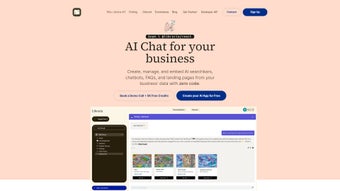
Libraria arrives at a moment when businesses of every size are seeking smarter ways to communicate with customers, leads, and internal teams. Unlike traditional chatbot platforms that demand coding expertise or steep learning curves, Libraria positions itself as a no‑code, subscription‑based web application that lets you design, train, and deploy AI‑powered conversational agents in minutes. The core promise is simple: custom AI chatbots made easy. By combining an intuitive drag‑and‑drop interface with built‑in machine‑learning analytics, Libraria empowers marketers, support agents, and product managers to craft responses that reflect their brand voice and data requirements without hiring a full‑stack development team.
What truly sets Libraria apart is its focus on personalization and data‑driven improvement. The platform not only lets you script personalized replies but also records every interaction, allowing you to review chat history, spot patterns, and continuously fine‑tune the bot’s behavior. This feedback loop is powered by an underlying AI engine that learns from each conversation, increasing response accuracy over time. Moreover, Libraria’s multimedia support—images, carousels, and rich cards—means the bot can deliver a visually engaging experience, which is crucial for e‑commerce, tourism, and any sector where visual storytelling drives conversion.
From a business perspective, Libraria offers a clear ROI pathway. The lead‑capture prompts let you collect email addresses, phone numbers, or custom fields directly within the chat, feeding the sales funnel without additional forms. The integrated API key provides a secure bridge to your existing CRM, analytics tools, or proprietary databases, ensuring that the chatbot operates with up‑to‑date information. In short, Libraria isn’t just another chatbot builder; it’s a comprehensive engagement platform that brings AI, analytics, and design together under a single, user‑friendly roof.
Key Features That Power Your Custom AI Chatbots
- No‑Code Bot Builder: Visual editor lets you assemble conversation flows with simple blocks, eliminating the need for programming.
- Personalized Response Engine: Tailor replies based on user data, location, or interaction history.
- Chat History Review & Optimization: Access a searchable log of all chats to refine scripts and improve accuracy.
- Multimedia Integration: Embed images, carousels, videos, and rich cards directly into the conversation.
- Machine‑Learning Analytics: Automated analysis of conversations to surface trends, sentiment, and gaps.
- Lead Capture Prompts: Built‑in forms that collect emails, phone numbers, and custom fields without leaving the chat.
- Secure API Key Access: Seamlessly connect to external databases, CRMs, or custom back‑ends for real‑time data.
- Cross‑Platform Embedding: Deploy bots on websites, mobile apps, or messaging platforms with a single snippet.
- Subscription‑Based Pricing: Predictable monthly costs with tiered plans for startups to enterprises.
- Continuous Updates & Support: Regular feature releases and a dedicated support team ensure the platform stays current.
Each feature is built with scalability in mind. For instance, the Machine‑Learning Analytics module does not just surface raw data; it presents actionable insights through dashboards that rank the most common user intents, flag low‑confidence responses, and recommend new dialog branches. The Multimedia Integration works across browsers and mobile devices, automatically optimizing image sizes and carousel behavior to keep load times low—an essential factor for SEO and user satisfaction.
The Lead Capture Prompts deserve special attention. Instead of redirecting visitors to a separate landing page, Libraria lets you embed a short, conversational form directly in the chat. This reduces friction, increases conversion rates, and keeps the user journey fluid. Combined with the API, you can push captured leads straight into HubSpot, Salesforce, or any webhook‑compatible service, ensuring that no opportunity slips through the cracks.
Overall, Libraria’s feature set addresses the entire chatbot lifecycle—from ideation and design to deployment, monitoring, and optimization—making it a one‑stop solution for businesses that want to leverage conversational AI without the overhead of traditional development cycles.
Installation & Usage: Getting Started in Under 30 Minutes
Step‑by‑Step Setup
Because Libraria is a cloud‑native SaaS platform, there is no traditional “download and install” process. Instead, you begin by creating an account on the Libraria website. After confirming your email, you’ll be directed to the dashboard where the first wizard helps you define the bot’s purpose—whether it’s a sales assistant, support agent, or knowledge base.
1. Create a New Bot: Click the “New Bot” button, give it a name, and select a template that matches your industry. Templates include pre‑written intents such as “order status,” “product recommendation,” and “FAQ lookup,” which you can edit or discard.
2. Design Conversation Flows: Using the visual flow builder, drag nodes onto the canvas. Nodes represent user inputs, bot replies, decision branches, or API calls. Each node can be customized with dynamic variables (e.g., {{user_name}}) that pull data from previous interactions or external sources.
3. Add Multimedia Elements: For any bot reply node, you’ll see an “Add Media” button. Upload images, select carousel templates, or embed video URLs. Libraria automatically generates responsive markup, ensuring the content looks great on both desktop and mobile.
4. Configure Lead Prompts: Insert a “Lead Capture” node wherever you want to ask for contact information. Choose the fields you need, set validation rules, and map the data to your CRM via the API key integration screen.
5. Set Up the API Key: Navigate to the “Integrations” tab, generate an API key, and copy it into your CRM or backend system. Libraria provides detailed documentation for popular platforms, including Zapier, HubSpot, and custom REST endpoints.
6. Publish & Embed: Once you’re satisfied with the flow, click “Publish.” Libraria generates a JavaScript snippet that you paste into the or of any webpage, or you can use the native SDK for iOS and Android apps. The bot appears as a floating chat widget, ready to engage visitors instantly.
7. Monitor & Optimize: After deployment, head back to the “Analytics” dashboard. Here you can view chat transcripts, conversion metrics, and AI confidence scores. Use the “Optimize” button to automatically suggest improvements based on low‑performing intents.
All of these steps are guided by contextual help bubbles, video tutorials, and a community forum, ensuring that even non‑technical users can launch a functional chatbot within half an hour. The platform also supports single‑sign‑on (SSO) via Google or Microsoft Azure, simplifying user management for larger teams.
Final Verdict, Pros & Cons, and Frequently Asked Questions
Libraria is a cloud‑native solution accessible through any modern web browser (Chrome, Firefox, Edge, Safari) on Windows, macOS, Linux, as well as mobile browsers on Android and iOS. Because the bot is delivered via an embeddable JavaScript snippet, it works seamlessly on WordPress, Shopify, Wix, and custom HTML sites. Additionally, Libraria offers native SDKs for iOS (Swift) and Android (Kotlin) that allow deeper integration within native mobile apps.
Pros
- Zero‑Code Creation: Perfect for marketers and product owners without programming backgrounds.
- Rich Media Support: Enables engaging visual experiences that boost conversion rates.
- Continuous Learning: Built‑in ML models improve response accuracy automatically.
- Lead Capture Integration: Directly feeds prospects into your CRM, shortening sales cycles.
- Cross‑Platform Embedding: Works on websites, mobile apps, and major messaging platforms.
- Scalable Pricing: Tiered subscription plans grow with your business needs.
- Robust Analytics: Actionable dashboards reduce guesswork in bot optimization.
Cons
- Subscription Cost: Ongoing monthly fees may be higher than one‑time purchase tools for very small businesses.
- Learning Curve for Advanced Features: Mastering API integrations and custom ML tuning requires time.
- Internet Dependency: As a SaaS product, uninterrupted internet access is mandatory for both setup and runtime.
- Limited Offline Capabilities: No native offline mode for on‑premise deployments.
- Customization Limits: Extremely niche use‑cases might hit constraints within the visual editor, requiring developer assistance.
Overall, Libraria shines for businesses that value speed, visual engagement, and data‑driven insights. Companies with tight budgets or highly specialized requirements may need to weigh the subscription cost against the convenience of an all‑in‑one platform.
Frequently Asked Questions
Can I use Libraria without any technical background?
Yes. Libraria’s drag‑and‑drop builder and pre‑made templates are designed for non‑technical users. You can create, publish, and monitor a chatbot without writing a single line of code.
What platforms can I embed a Libraria chatbot on?
The chatbot can be embedded on any website using a simple JavaScript snippet, as well as on mobile apps via the iOS and Android SDKs. It also integrates with popular CMS platforms like WordPress, Shopify, Wix, and custom HTML sites.
How does Libraria handle data privacy and security?
All data transmission is encrypted using TLS 1.2+. API keys are stored securely, and you can configure IP whitelisting for added protection. Libraria complies with GDPR and CCPA, giving you control over data retention and export.
Is there a free trial or demo available?
Libraria offers a 14‑day free trial with full access to all features, allowing you to test the platform before committing to a paid plan. No credit card is required to start the trial.
Can I connect Libraria to my existing CRM?
Absolutely. The secure API key lets you integrate Libraria with any CRM, including HubSpot, Salesforce, and custom solutions, so leads captured in‑chat flow directly into your existing pipelines.
Ready to experience a faster, smarter way to engage visitors? Start your free trial now and launch a fully functional AI chatbot in under an hour. The combination of zero‑code creation, rich media, and continuous learning makes Libraria the ideal choice for teams that want to boost conversions while keeping operational overhead low.



.png)



